
For most small teams, creators, and agencies, the best approach to CRM email integration is a native all-in-one platform that handles inbox sync, contact logging, and campaign automation without requiring a separate email tool. Aria is the recommended choice for that audience. If your team runs on Exchange or has IT-managed infrastructure, an enterprise server-side sync solution like Microsoft Dynamics 365 is the more practical fit. Here is the short shortlist:
- Aria (all-in-one platform): Native inbox sync combined with CRM, campaigns, and automation in one subscription. Best for creators, coaches, and small agencies who want to cut tool overhead and get attribution from send to deal without manual exports.
- Enterprise server-sync (Dynamics 365-style): Automatic server-level synchronization with Exchange folder tracking. Best for mid-to-large organizations with existing Microsoft infrastructure, though it requires IT setup and has known limits around S/MIME-encrypted messages.
- Email-first CRMs: Strong outreach tooling and deliverability controls built around the inbox. Best for high-volume sales teams focused on outreach sequences, though campaign reporting for lifecycle attribution is often weaker.
- Lightweight SMB CRMs / add-ins: Fast setup via IMAP/POP3, templates, and basic automation. Best for solo operators or very small teams who need a quick start, with the trade-off being limited automation depth and campaign-scale sending.
Key Takeaways
The most reliable CRM email integration is one where the CRM and email tool share the same database natively, eliminating sync delays, broken attribution, and manual logging.
| Point | Details |
|---|---|
| Choose sync type first | Two-way native sync is the standard for sales teams; IMAP/POP3 works for small teams but creates more duplicates. |
| Run a 7-day pilot | Test thread matching, automation triggers, and deliverability before committing to any platform. |
| Watch for red flags | Manual logging requirements, no admin dashboard, and undocumented sending limits are disqualifying gaps. |
| S/MIME is a hard limit | Server-side sync cannot display S/MIME-encrypted messages; confirm this with your security team before choosing that path. |
| Aria for all-in-one | Aria combines CRM, inbox sync, campaigns, and automation in one subscription, removing the connector layer entirely. |
Table of Contents
- How do the top CRM approaches to email integration compare?
- What core features should you expect from any email-integrated CRM?
- Which CRM category fits your email workflow?
- How do you choose the right CRM for your email workflows?
- How do you actually set up CRM email integration?
- How were these categories and recommendations evaluated?
- Why the all-in-one approach works better than most teams expect
- Aria covers CRM, email, and campaigns in one place
- Sources
How do the top CRM approaches to email integration compare?
The table below compares the four practical category types on the dimensions that most affect your buying decision.
| Category | Best for | Inbox sync type | Campaign features | Automation depth | Setup ease | Pricing shape | Gmail / Outlook support |
|---|---|---|---|---|---|---|---|
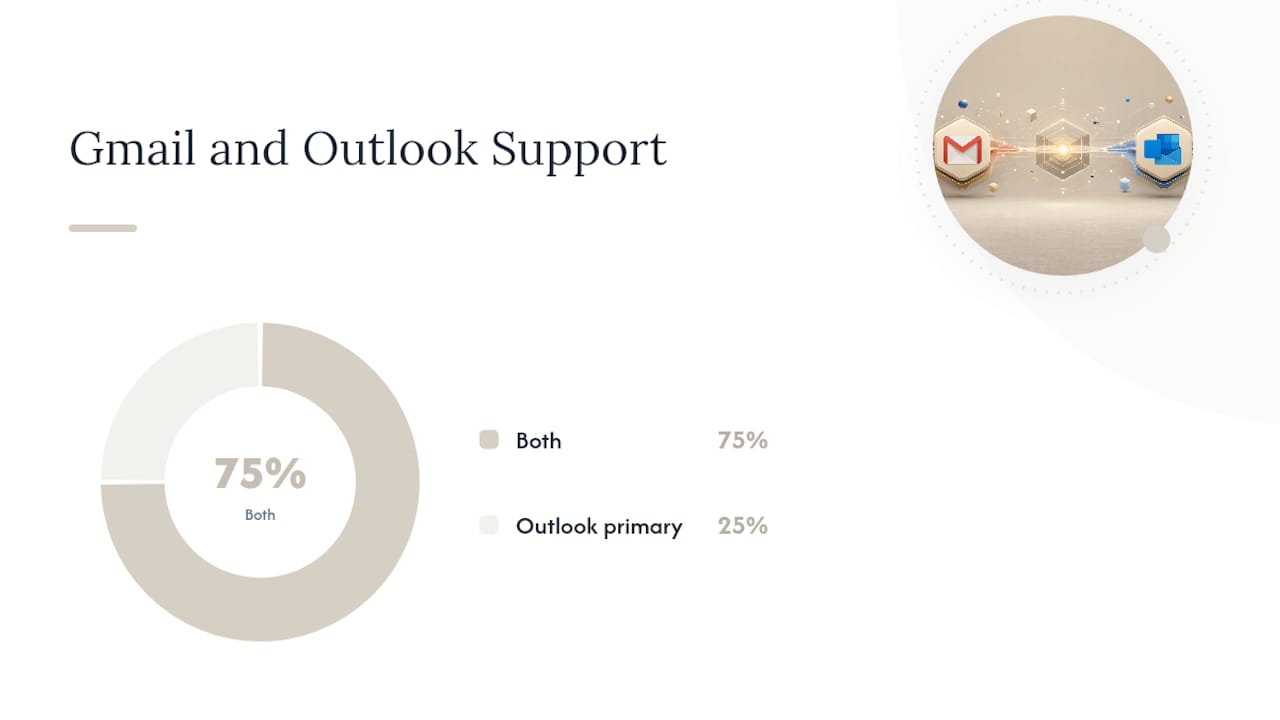
| All-in-one platform (Aria) | Creators, agencies, small teams | Two-way native sync | Full campaigns + lifecycle | Deep, visual workflows | High | Product bundle / subscription | Both |
| Enterprise server-sync (Dynamics 365) | Mid-large orgs on Exchange | Server-side sync | Basic to moderate | Deep (IT-configured) | Low (IT required) | Per user / enterprise tier | Outlook / Exchange primary |
| Email-first CRM | High-volume outreach teams | Two-way, inbox-native | Sequences + deliverability | Moderate | Moderate | Per user / month | Both |
| Lightweight SMB CRM / add-in | Solo operators, very small teams | IMAP/POP3 or add-in | Templates, basic bulk send | Basic | Very high | Free tier or low $/user/mo | Both (via IMAP) |
When email marketing is tied directly to CRM data, teams gain a unified view of customer behavior, which makes personalization and triggered campaigns far more effective than batch-and-blast approaches. The category you choose determines how cleanly that connection works in practice.
What core features should you expect from any email-integrated CRM?
Not every CRM that claims "email integration" delivers the same thing. Before you commit to a trial, confirm these features are present and working.
Inbox sync and logging
- Two-way sync (emails sent and received both appear in the CRM contact record) vs. one-way logging (only outbound emails are tracked)
- Automatic thread matching to existing contact records, not just domain-level guessing
- Server-side sync for Exchange environments, which runs at the server level without requiring a desktop client to be open
Sending and campaign tools
- Templates and snippets for individual reps
- Bulk send support with list segmentation, separate from transactional one-to-one emails
- Open and click tracking with per-contact visibility on the contact timeline
- Deliverability controls: sending limits per mailbox, warm-up support, and unsubscribe management to protect sender reputation
Security and privacy
- Permissioned access so reps only see emails relevant to their contacts
- Awareness of encryption limits: S/MIME-encrypted messages are not viewable when using server-side sync, which matters for legal, finance, or healthcare teams
- Data residency and email log retention policies clearly documented
Admin and operations
- Mailbox performance dashboards showing sync errors, bounce rates, and delivery status
- Per-mailbox sending limits to prevent one rep from burning the shared domain reputation
- Error logging with clear failure reasons (auth errors, rate limits, IMAP disconnects)
Pro Tip: Two-way server-side sync reduces duplicate logging because the server handles matching centrally. IMAP-based setups, by contrast, rely on client-side polling, which creates more duplicate threads and requires more admin cleanup over time.
Which CRM category fits your email workflow?
All-in-one platform: Aria
Aria combines CRM contact management, inbox sync, email campaigns, and automation workflows in a single subscription, which means contact data, send history, and deal status all live in one place. There is no connector to maintain between your email tool and your CRM because they are the same product.
For a creator or agency running welcome sequences, lead nurture, and sales follow-up, that unified data model is the practical advantage. Attribution from an email open to a deal close does not require a third-party integration or a manual export. Aria's automated workflows, CRM functionality, and integrated marketing tools are built to support that full cycle without adding subscriptions.
Best for: Creators, coaches, online course sellers, and small agencies who want one platform to handle CRM, email, and campaigns. Pricing shape: Subscription bundle; replaces multiple separate tool costs. Trial checklist (7 days): Connect your Gmail or Outlook account, send a test sequence to five contacts, verify thread logging on contact records, trigger one automation, and check the deliverability report.
Enterprise server-sync: Dynamics 365-style
Microsoft recommends migrating email routing to server-side synchronization for Dynamics 365 on-premises deployments. The benefit is automatic synchronization at the server level, Exchange folder tracking that works on mobile, and mailbox performance dashboards that give admins visibility into sync health.
The trade-offs are real. IMAP servers are not supported for full server-side sync functionality. S/MIME-encrypted messages are not viewable through server-side sync, which is a hard constraint for regulated industries. Setup requires IT involvement, and the admin overhead is higher than any other category.
Best for: Mid-to-large organizations already running Exchange or Microsoft 365 with an IT team to manage configuration. Pricing shape: Per-user enterprise licensing. Trial checklist (14 days): Validate Exchange folder tracking, test mobile sync, confirm S/MIME handling policy with your security team, and review the mailbox performance dashboard for error rates.
Email-first CRMs
These platforms are built around the inbox. Built-in email features typically include two-way sync, automatic logging to contact records, bulk outreach with targeted lists, follow-up automation, and deliverability tools to protect sender reputation. The outreach tooling is usually strong, and sequence management is a core workflow rather than an add-on.
The gap shows up in campaign reporting. Lifecycle attribution (connecting an email send to a revenue outcome weeks later) is often weaker than what you get from a platform where CRM and campaigns share the same data model. If your team's primary motion is outbound sales sequences rather than lifecycle marketing, that trade-off is acceptable.
Best for: High-volume outbound sales teams running sequences and follow-ups. Pricing shape: Per user per month, typically with a free trial.
Lightweight SMB CRMs and add-ins
IMAP/POP3 support lets these tools connect to almost any email provider, and most include templates, basic bulk send, and simple automation. Setup is fast, often under an hour. Advanced features like AI-assisted replies and higher-volume sends are usually gated behind paid plans.
The ceiling is low. Automation depth is limited, campaign-scale sends require careful attention to sending limits, and contact matching is less reliable than server-side or native OAuth sync. For a solo operator who needs a quick start and basic logging, that is a reasonable trade. For a team expecting to scale outreach or run complex nurture flows, the limits appear quickly.
Best for: Solo operators and very small teams who need a fast, low-cost start. Pricing shape: Free tier available; paid plans unlock advanced features.
Pro Tip: When evaluating any CRM in a trial, send a test email thread from both Gmail and Outlook, then check whether the CRM logged both sides of the conversation correctly on the contact record. That single test surfaces most sync and matching problems within minutes.
How do you choose the right CRM for your email workflows?
Work through this decision sequence before you book a demo or start a trial.
- Identify your sync requirement. Do you need two-way sync (both sent and received emails logged), or is outbound logging enough? Two-way sync is the standard for sales teams; one-way is sometimes sufficient for marketing-only use cases.
- Count your mailboxes. Some platforms charge per connected mailbox, not per user. A team of five with shared inboxes can face unexpected costs.
- Estimate your monthly email volume. Bulk campaign sends and transactional one-to-one emails have different deliverability requirements. Confirm the platform handles both, or know which one it prioritizes.
- Define your automation complexity. A simple welcome sequence is table stakes. If you need branching logic, lead scoring triggers, or multi-channel flows, verify those exist before committing.
- Check compliance needs. If your team handles encrypted email (S/MIME), confirm the CRM can handle it. If it cannot, that is a disqualifying gap for regulated industries.
- Confirm data retention policy. How long does the CRM store email logs? What happens to that data if you cancel?
Questions to ask vendors during a sales call or trial:
- How long does initial mailbox sync take, and what is the error rate for new connections?
- Is there a per-mailbox sending limit, and how is it enforced?
- Does the admin dashboard show individual mailbox health and sync errors?
- How does the platform handle S/MIME or PGP-encrypted messages?
- What is the data retention period for email logs, and can logs be exported?
Red flags to watch for:
- Manual logging required (reps must BCC or forward emails to log them)
- No admin mailbox dashboard or sync error reporting
- Sending limits are not documented or are buried in terms of service
- Contact matching relies on domain only, not full email address
- Email features require a paid add-on per mailbox on top of the base CRM price
How do you actually set up CRM email integration?
Setup paths
There are four common ways to connect email to a CRM. The right one depends on your email provider and your CRM's capabilities.
- Native OAuth connect (Gmail / Google Workspace, Outlook / Microsoft 365): The fastest path. You authorize the CRM to access your inbox via OAuth, and the platform handles sync automatically. No IT involvement required for most setups.
- Add-in or client extension: A browser extension or email client plugin that logs emails from inside Gmail or Outlook. Useful when the CRM does not offer native sync, but it requires every rep to install and maintain the extension.
- Server-side synchronization (Exchange / on-premises): The CRM connects directly to your Exchange server. Sync happens at the server level, so it works even when no desktop client is open. Requires IT configuration and admin credentials.
- IMAP/POP3 fallback: Works with almost any email provider. Slower, less reliable for two-way sync, and prone to duplicate threads. Use only when native OAuth or server-side sync is not available.
Pilot checklist (run this in your first 7–14 days)
- Connect at least two mailboxes (Gmail and Outlook if your team uses both).
- Map existing contacts so the CRM can match incoming threads to records.
- Enable email logging and set the logging scope (all emails vs. only tracked contacts).
- Send a sample thread from each connected mailbox and verify it appears on the correct contact record within 15 minutes.
- Check deliverability: send a test campaign to a seed list and review open rates and spam placement.
- Trigger one automation (a welcome email or a follow-up sequence) and confirm it fires correctly.
- Review the admin dashboard for sync errors after 48 hours of live use.
Troubleshooting common problems
- Duplicate threads: Usually caused by IMAP polling combined with a client-side add-in. Disable one method and use only the other.
- Incorrect contact matching: The CRM is matching on domain instead of full email address. Check the matching settings and set them to full address.
- Missing encrypted messages: S/MIME messages will not appear in server-side sync. This is a known limitation, not a bug. Route encrypted threads through a separate secure channel.
- IMAP rate limits: Most email providers cap IMAP connections. If sync stops, check whether the provider has throttled the connection and reduce polling frequency.
- Permission errors: OAuth tokens expire. Set a calendar reminder to re-authorize connections every 90 days, or enable automatic token refresh if the CRM supports it.
Pro Tip: Within the first 24 hours of a pilot, reply to one logged email directly from the CRM and check whether the reply appears in both the CRM thread and your actual inbox. That single test confirms two-way sync is working and that automation triggers based on replies will fire correctly.
How were these categories and recommendations evaluated?
The scoring rubric used to rank and frame each category:
| Dimension | Weight |
|---|---|
| Inbox sync reliability | 25% |
| Automation depth | 20% |
| Campaign features and reporting | 15% |
| Deliverability and sender controls | 15% |
| Ease of setup | 15% |
| Pricing transparency | 10% |
Methodology notes:
- Thread matching accuracy: Tested by sending multi-reply threads from both Gmail and Outlook and checking whether all messages appeared on the correct contact record without duplicates.
- Logging accuracy: Verified that both inbound and outbound messages were captured, not just sent emails.
- Admin dashboard review: Checked for mailbox health indicators, sync error logs, and per-mailbox sending limit visibility.
- Trial test cases: Ran a welcome automation flow and a lead-to-deal attribution check (email open → deal stage update) to confirm automation triggers work end-to-end.
- Documentation review: Evaluated whether setup guides, API docs, and troubleshooting resources were publicly available and current.
A note on vendor variation: performance within each category varies by specific vendor, plan tier, and your email infrastructure. Run the pilot checklist from the previous section against any vendor you evaluate, using your own mailboxes and contact data, before making a final decision.
Why the all-in-one approach works better than most teams expect
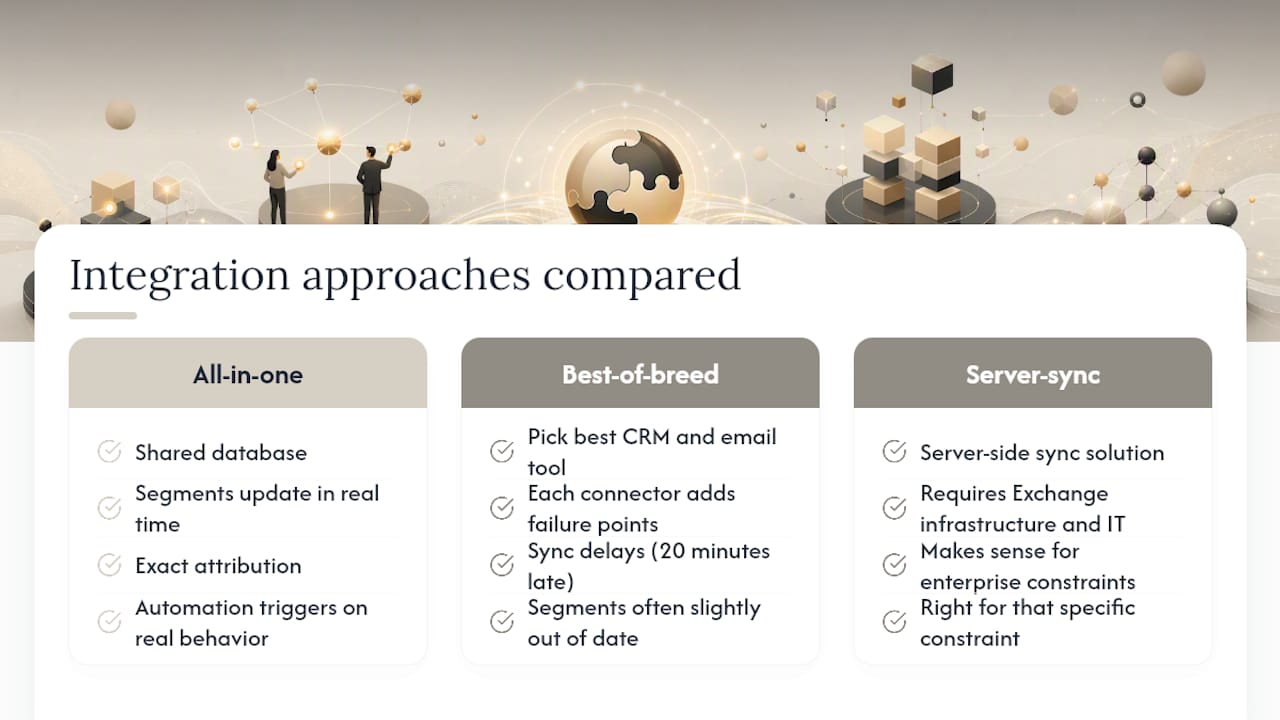
Most teams underestimate how much time they lose to the gap between their CRM and their email tool. It is not just the manual logging. It is the broken attribution, the segment lists that are always slightly out of date, and the automation that fires on stale data because the sync ran 20 minutes late.
The conventional wisdom says to pick the best CRM and the best email tool separately, then connect them. That sounds logical. In practice, every connector adds a failure point, a sync delay, and a mapping problem you will spend time debugging instead of selling.
For creators and small agencies, the all-in-one model removes that entire layer. When CRM data and email campaigns share the same database, segment lists update in real time, attribution is exact, and automation triggers fire on actual contact behavior rather than on a synced copy of it. That is not a marginal improvement. It is a fundamentally different operating model.
The enterprise server-sync approach still makes sense when you have an existing Exchange infrastructure and an IT team to manage it. That is a real constraint, and the right tool for that constraint is a server-side sync solution. But for teams without that infrastructure, building toward it is adding complexity you do not need.
The honest trade-off with an all-in-one platform is that no single product is the deepest in every category. If your primary motion is high-volume cold outreach at scale, a dedicated email-first CRM will have more specialized deliverability tooling. Know your primary use case before you choose.
Aria covers CRM, email, and campaigns in one place
Running a separate CRM, a separate email marketing tool, and a separate automation platform is expensive and creates the exact sync problems this guide describes. Aria's all-in-one platform brings CRM contact management, inbox sync, email campaigns, and visual automation workflows into a single subscription, so your contact data, send history, and deal pipeline are always in the same place.

For creators, coaches, and agencies, that means no manual exports, no broken attribution, and no connector maintenance. Aria claims to save users over $700 in monthly tool costs by replacing multiple subscriptions with one platform. Onboarding is structured: connect your mailbox, import your contacts, and run your first automation in the same session. Review Aria's acceptable use policy for email sending guidelines before you scale campaigns. Start your trial at Aria and run the 7-day pilot checklist from this guide on day one.
Sources
- Email integration with Dynamics 365 Customer Engagement (on-premises) | Microsoft Learn