
Use a five-phase launch: validation, pre-launch, build, launch week, post-launch. Finish these before you open cart:
- Proof of demand (pre-sales, a waitlist, or at least 10 real customer conversations)
- A working checkout with a tested payment gateway
- A live content or landing page describing the course and its outcome
Skip any one of these and you're guessing instead of launching. Each phase builds on the last, and most successful launches follow this exact sequence because compressing or skipping a phase almost always shows up later as weak sales or high refunds. A platform like Aria can run the community, payments, and email side of this in one place, which matters once you're juggling five phases at once.
TL;DR:
- Validate demand with at least 10 customer interviews, a pre-sale, or a paid workshop before starting course creation to ensure market interest.
- Build your pre-launch email list, content previews, and audience warmth at least two to three weeks before cart opening to maximize engagement.
- Expect and plan for 40 to 60% of total sales to occur in the final 24 hours of launch, with targeted emails and social posts around that buying curve.
- Conduct comprehensive QA of payment systems, course accessibility, and licensing during production to avoid technical issues during launch.
- Use post-launch metrics such as conversion rate and refund rate to measure success and inform adjustments for future launches.
Table of Contents
- What Are the Five Phases of a Course Launch Timeline?
- Course Launch Checklist: The Complete Phase-by-Phase Breakdown
- What Should Your Launch-Week Email Sequence Look Like?
- How Do You Turn Buyers Into Long-Term Students and Revenue?
- What Belongs on Your Pre-Publish Tech and QA Checklist?
- Which Backward-Planning Timeline Fits Your Launch?
- How Aria Helps You Run This Entire Checklist in One Place
- Key Takeaways
- Sources
What Are the Five Phases of a Course Launch Timeline?
Validation comes first: you're testing whether people will actually pay, not just nod along in a survey. Pre-launch is the warm-up, where you build the email list and audience that will hear about cart open. Build and production is where the actual course gets recorded, edited, and assembled. Launch week is the cart-open sprint. Post-launch is everything after the sale, onboarding, refunds, and lessons for next time.
A typical online course checklist runs 8 to 12 weeks from validation to cart close, though a smaller list or a simpler course can move faster. Track phase-level numbers as you go:
- Validation: aim for a pre-sale conversion above 10% among warm leads before building anything
- Pre-launch: watch email list growth and open rates weekly
- Launch week: monitor cart conversion rate daily, not just at the end
- Post-launch: refund rate is your clearest signal that the offer matched what you sold
Rushing validation to "get to the fun part" of recording is the single most common mistake, and it's the one that quietly caps your revenue before you've written a single script.
Course Launch Checklist: The Complete Phase-by-Phase Breakdown
This is the working checklist. Copy it, adapt it, and don't skip ahead.
1. Validation
- Conduct at least 10 customer interviews focused on pain points and willingness to pay.
- Run a pre-sale or a paid workshop to confirm people will hand over money, not just interest.
- Test two or three price points with a small segment before committing to a final number.
- Build a waitlist page to capture demand you haven't converted yet.
2. Pre-launch audience warming
- Create a lead magnet tied directly to the course topic, not a generic freebie.
- Segment your list into "warm" (engaged) and "cold" (subscribed but quiet) groups.
- Draft your full email sequence now, not during launch week when you're scrambling.
- Schedule a free webinar or live Q&A two to three weeks before cart open.
- Publish two or three content previews (a lesson snippet, a worksheet, a short video) to build trust.
3. Build and production
- Finalize scripts and lesson outlines before recording, not while recording.
- Record and edit video or audio, then add captions and transcripts as you go.
- Build assessments or completion checkpoints so students have a clear sense of progress.
- Confirm licensing on any third-party image, music, or template you're using. Creative Commons Attribution 4.— is a common license to check for reused assets, but confirm the exact terms before you publish.
4. Launch week
- QA the entire cart page on desktop and mobile before it goes live.
- Run a real test purchase through your payment gateway, not just a sandbox transaction.
- Verify tracking pixels and analytics are firing correctly on the checkout page.
- Assign daily promotional tasks (one email, one to two social posts, one community touchpoint) so nothing gets forgotten.
5. Post-launch
- Send a welcome sequence and first-week check-in to new students automatically.
- Track refund requests and ask why, directly, when they happen.
- Capture testimonials and outcomes while the experience is still fresh.
- Review revenue, conversion rate, and average order value against your validation numbers.
Pro Tip: Batch your launch-week promotional content during the build phase. Trying to write daily social posts and emails while also answering support tickets during cart week is how good launches turn into exhausting ones.
What Should Your Launch-Week Email Sequence Look Like?
Cart week isn't evenly paced. Most launches see 40 to 60% of total sales land in the final 24 hours before the cart closes, which means your last-chance emails carry more weight than people expect. Build your sequence around that reality.
- Day 1, cart open: Announce the course, state the outcome clearly, open early-bird pricing.
- Day 2, teach: Send a value-packed lesson or framework that previews the course's quality.
- Day 3, social proof: Share testimonials, case results, or a student story if you have one from a beta round.
- Day 4, live event: Host a webinar or workshop that answers objections in real time.
- Day 5, offer reminder: Recap the offer and note the early-bird deadline is approaching.
- Day 6, urgency: Announce a price bump or bonus expiring at midnight.
- Day 7, last chance: Send two emails, morning and a few hours before close, with a plain subject line like "closing tonight."
Pair each email with one or two social posts and post-webinar clips to keep momentum visible outside the inbox.
How Do You Turn Buyers Into Long-Term Students and Revenue?
The sale is the easy part. What happens in the first two weeks after determines whether people finish the course, ask for refunds, or become your best marketing asset.
- Automate a welcome sequence and first-week check-in. This step alone measurably lowers refund rates and improves completion.
- Ask for outcomes and testimonials at two points, once at week two and again at completion, rather than a single generic request.
- Track revenue, conversion rate, average order value, refund rate, and lifetime value after every launch.
- Compare those numbers against your validation-phase targets to see exactly where the next launch needs to improve.
A launch that ends at "cart closed" leaves money on the table. The real return comes from what you build into the weeks after.
What Belongs on Your Pre-Publish Tech and QA Checklist?
Technical gaps are the quiet reason good courses underperform. Before you publish, confirm:
- Course settings, publish status, and enrollment flow all work end to end, including role assignments and syllabus visibility if you're on an institutional-style platform.
- Payment gateway test purchases go through cleanly, with receipts and access granted automatically.
- Captions, transcripts, color contrast, and keyboard navigation meet basic accessibility standards, checked during production rather than after launch.
- Every third-party asset (music, stock footage, templates) has confirmed licensing or permission on file.
Pro Tip: Run your own test enrollment from a fresh, logged-out browser the day before cart opens. It's the fastest way to catch a broken checkout link before a paying student does.
Which Backward-Planning Timeline Fits Your Launch?
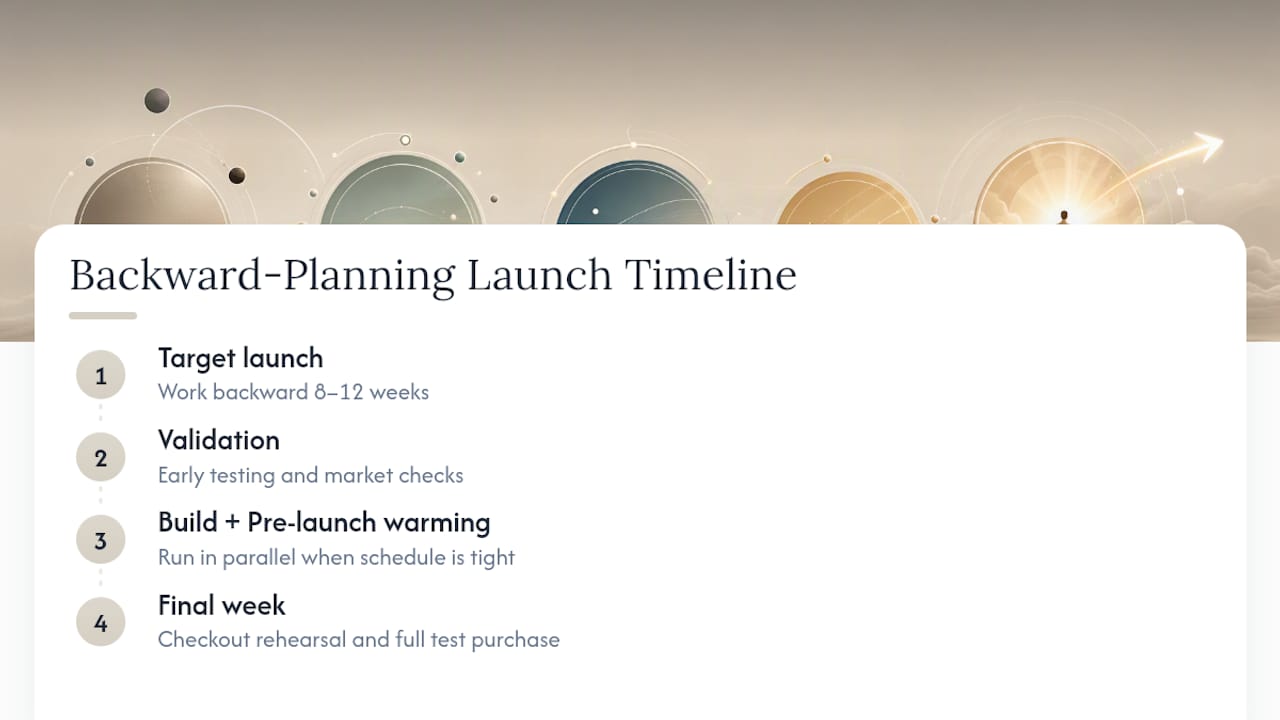
Backward-planning from your target launch date, working backward across roughly 8 to 12 weeks, keeps validation, build, and pre-launch warming from colliding.
Run build and pre-launch warming in parallel wherever your schedule is tight. Reserve the final week, no exceptions, for checkout rehearsal and a full test purchase.
What I've learned about launches that actually hold up
The habit that separates smooth launches from chaotic ones is boring: batch your recording and your outreach during pre-launch, before cart week eats your attention. Running the checklist inside one connected system, the way Aria ties community, payments, and email together, removes the coordination tax that quietly wrecks otherwise solid plans.
— Anastasia
How Aria Helps You Run This Entire Checklist in One Place
Aria replaces the pile of separate tools most creators stitch together for a launch. Instead of one app for the course, another for email, another for payments, and a fourth for your community, you run all of it, course hosting, membership access, automated email sequences, CRM, and payment processing, from a single platform built for creators and educators.

That matters most during launch week, when a broken handoff between tools is exactly the kind of technical gap the checklist above tells you to catch early. Aria's automated workflows can handle your welcome sequence and first-week check-ins automatically, the same post-launch step tied to lower refund rates, without you rebuilding it launch after launch. If you're also warming an audience before cart open, pairing this with a community-first growth approach gives you a built-in list to launch to instead of starting cold. If your validation phase involves packaging an idea into a sellable asset fast, a partner service like 1-Hour Book Publisher can help you turn early content into a funnel-ready asset within weeks.
Start a trial on Aria's platform and map your next launch checklist directly onto its course, payment, and email tools before your cart date is locked in.

Key Takeaways
A course launch succeeds when validation, pre-launch warming, build, launch week, and post-launch each get dedicated time and their own success metric, rather than being compressed into a single rushed sprint.
| Point | Details |
|---|---|
| Validate before you build | Confirm demand with 10+ interviews, a pre-sale, or a paid workshop before recording anything. |
| Front-load pre-launch warming | Build your list and email sequence weeks before cart opens, not during launch week. |
| Expect a launch-week spike | Plan for 40 to 60% of sales in the final 24 hours and structure emails around that curve. |
| Don't skip QA or accessibility | Test payments, captions, and licensing during production, not after publish. |
| Use post-launch data to improve | Track conversion rate, refund rate, and average order value to sharpen the next launch. |
| Run it on one platform | Aria combines course hosting, payments, email, and CRM so the checklist runs from a single system. |
Sources
- The Complete Online Course Launch Checklist — COURSE
- How to Create an Online Course in 6 Steps (And Start Earning Passive Income)
- Accessibility